ابن الهيثم تقديم
محمد منصري
سامح منصري
خالد منصري
قيس نصيب
review intel core i7 8th waw ?
Obtenir le lien
Facebook
X
Pinterest
E-mail
Autres applications
G
Intel’s 6-core 8th generation Core i7-8700K CPU is the reality check to high-performance, high-priced CPUs like the $2,000 Core i9 and $1,000 AMD Ryzen Threadripper. The real battle for the desktop and consumer’s wallets is with this amazingly affordable (for Intel anyway) $359 CPU, code-named Coffee Lake.
In fact, the Core i7-8700K is Intel’s first real response to AMD’s breakthrough series of Ryzen 5 and Ryzen 7 CPUs, and a viable alternative to the Zen-based CPUs. But just how fast is it, and which CPU should you buy? Read on to find out. Gordon Mah Ung
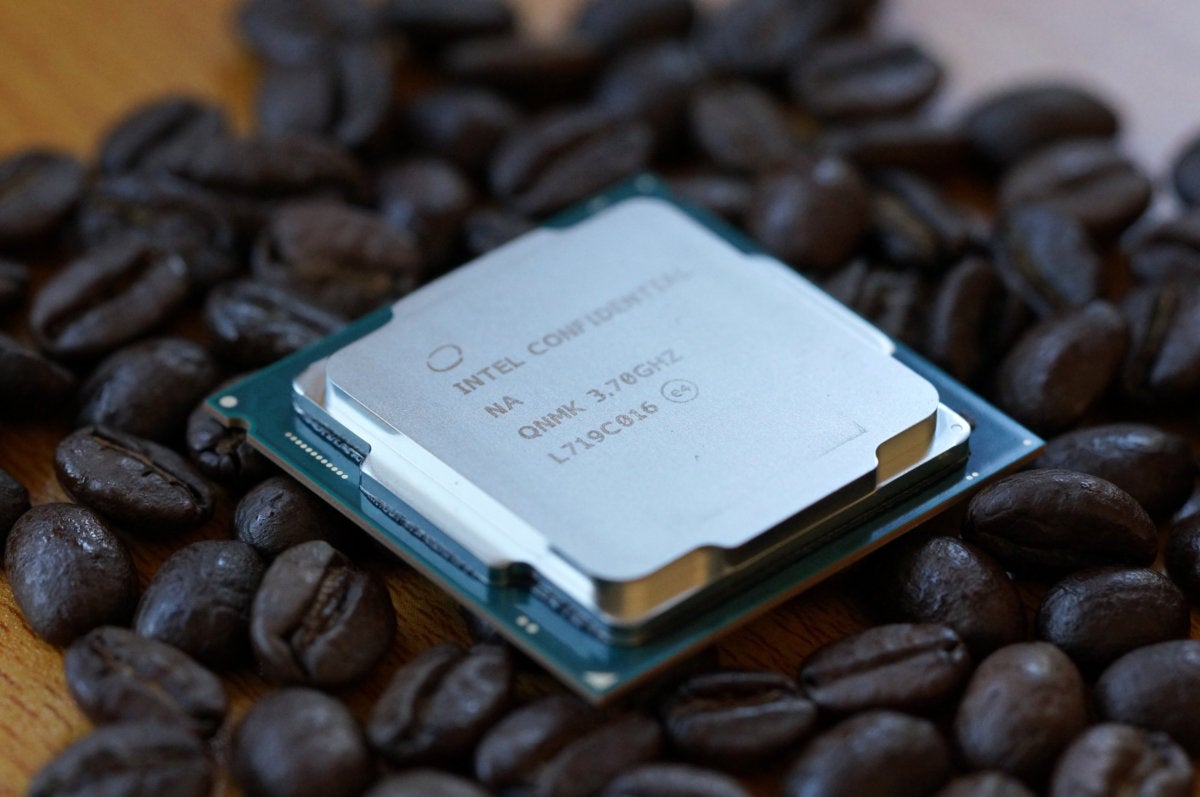
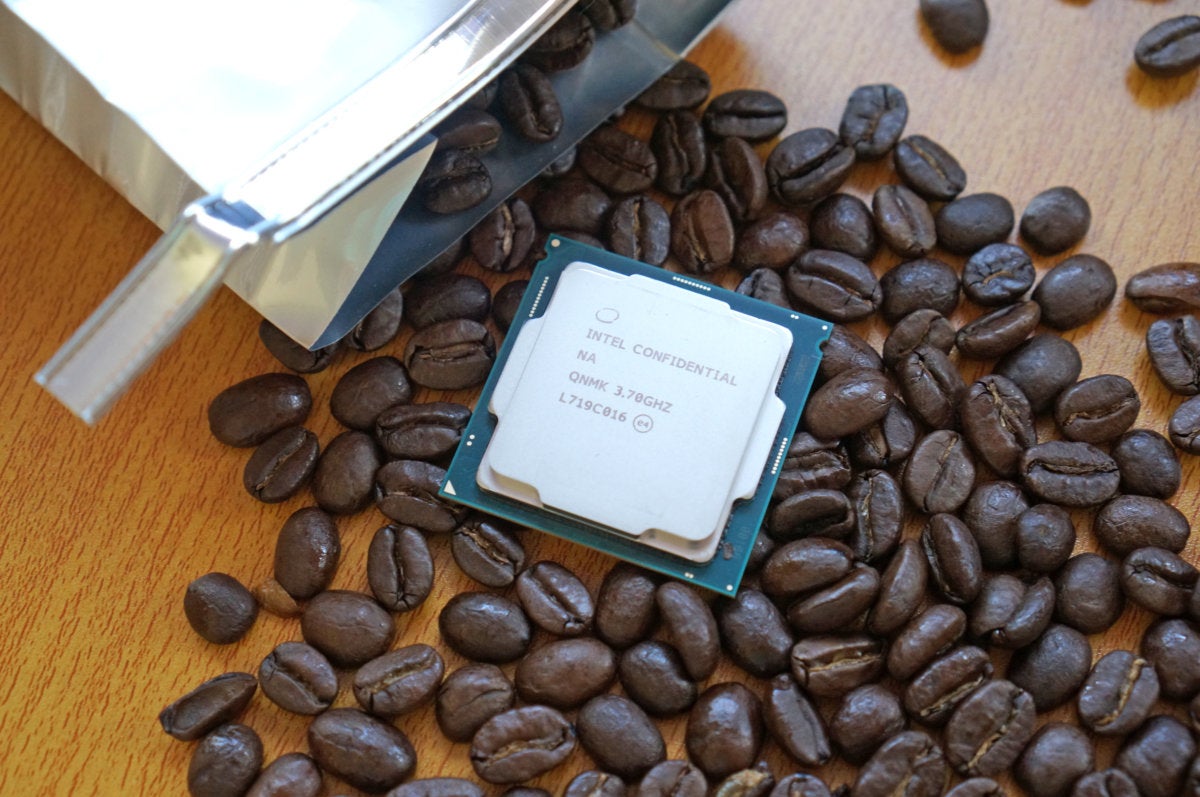
Intel’s new Coffee Lake Core i7-8700K is a serious cup of joe for those into performance.
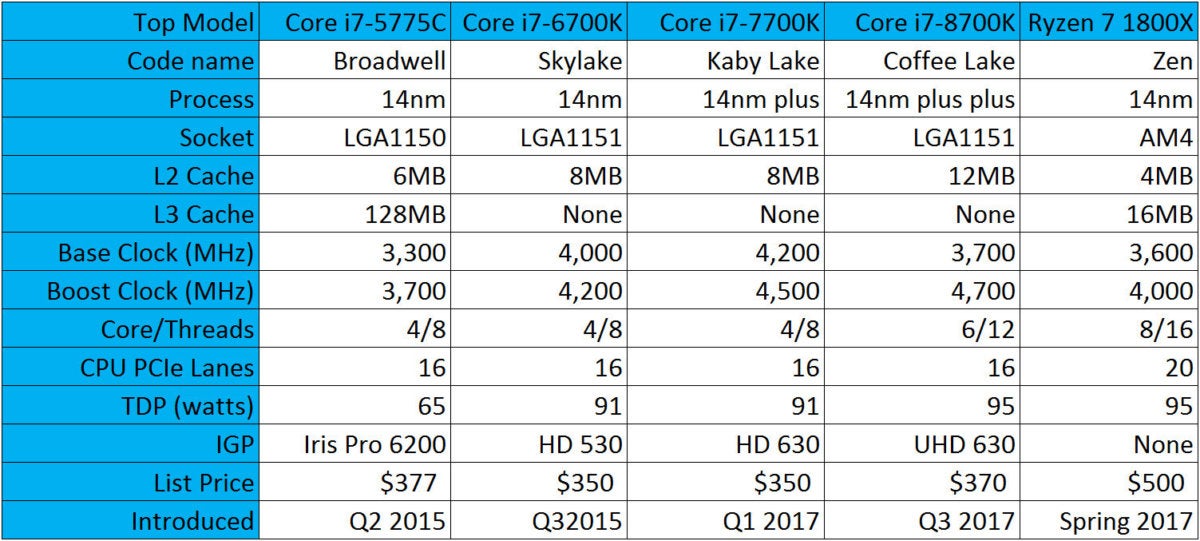
Moore’s Law isn’t dead, but the ability to shrink CPU
circuits and increase density has drastically slowed down. Coffee Lake,
for example, is based on the same 14nm process the company introduced
with its Broadwell line of laptops CPUs in 2014. Since then, Intel has
used the 14nm process on Skylake, Kaby Lake, and now Coffee Lake.
Despite
the similar process, however, Intel says it’s made enough improvements
along the way to call Coffee Lake a “14nm plus plus” chip. A simpler way
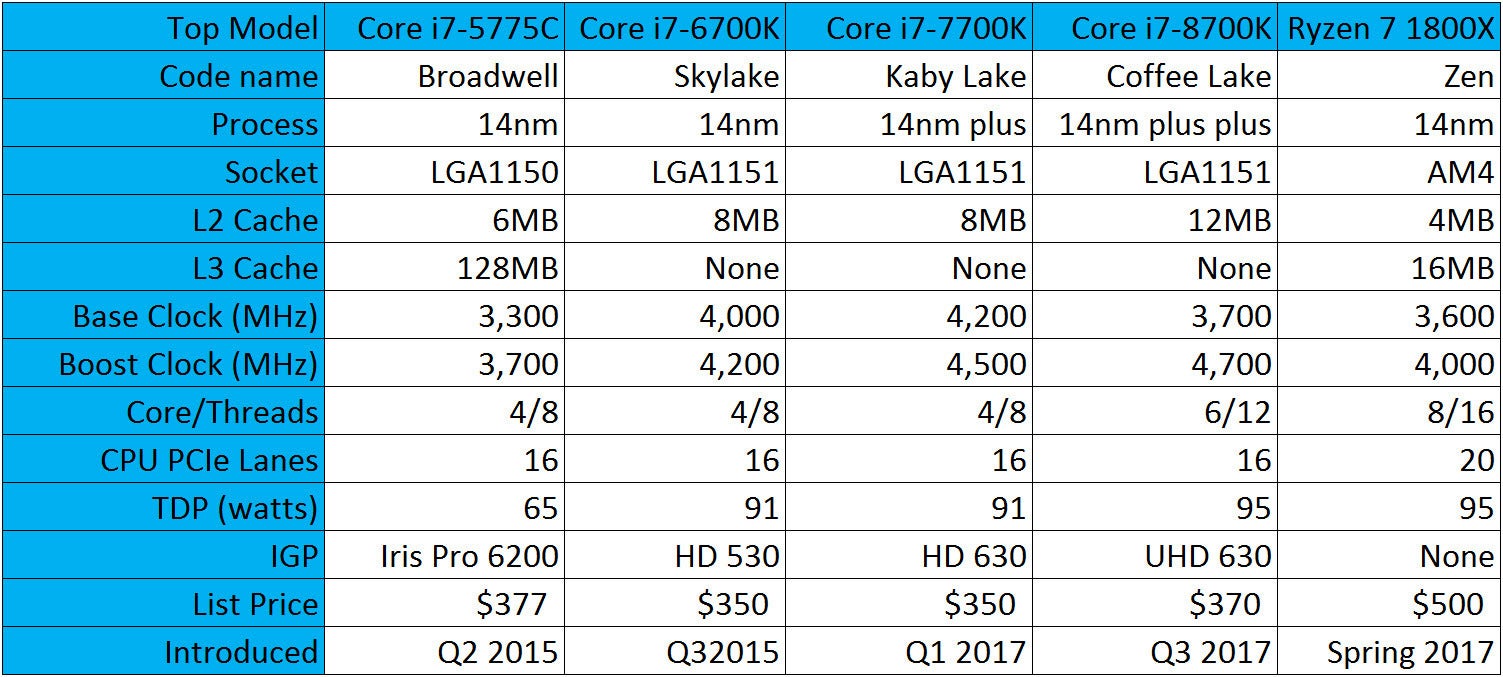
is to think of Coffee Lake as an improved 7th-generation Kaby Lake chip
with two more cores, though there are some subtler changes. IDG
Intel’s top mainstream CPUs alongside AMD’s fastest Ryzen 7 CPU. So yes, cynics, the only true
“8th-generational” part may be the name itself. Folks of a more
forgiving mindset will see 8th-gen chips as a big breakthrough for
Intel, which has offered quad-core CPUs as luxury models exclusively for
the last ten years. Consider that Intel once charged $1,000 for 6-core
CPUs. With Coffee Lake, you’re getting two more cores for the nearly the
same price as Kaby Lake and Skylake. Intel
Here’s the full line up of “8th generation” CPUs from Intel.
Why Coffee Lake requires a new motherboard
Although
Coffee Lake is essentially an improved Kaby Lake CPU, some key changes
will drive Intel fans simply batty. The main one is its incompatibility
with older motherboards, despite using the exact same physical LGA1151
socket.
Why, Intel, why? The company cites several changes. The
first is official support for DDR4/2666 instead of of DDR4/2400. The
higher-clocked RAM required more tightly controlled layout of the wires
or “traces” on the motherboard, which mandated new designs.
Coffee
Lake also adopts the nifty “per core” overclocking first introduced
with the Core i7-6950X Broadwell-E. This allows a user to overclock just
individual cores based on the workload.
All
this added up to the Z370 chipset you’ll find on new motherboards, the
company said. One thing that isn’t clear, however, is why Z370 won’t
work with older CPUs. Because both the Z270 and Z370 use the same socket
and pretty much the same chipset pinout, why can’t you put your older
7th-gen Kaby Lake into a newer Coffee Lake Z370 mobo? All Intel would
say is its board partners actually requested a clean break from the past
with the new chipset. Gigabyte
The Gigabyte Aorus Gaming 7 used for our tests features the exact
same socket that previous-generation Intel chips used but will work
only with 8th-generation chips.
How we tested
For
this review, we looked at the top chip of the lineup: the Core
i7-8700K. We compared it primarily to its nemesis: AMD’s Ryzen 7 1700X.
Although technically priced at $399, we easily found the chip for $359 at Amazon.com or even cheaper when on sale.
Our original review of the Ryzen 7
was focused on the top CPU, the Ryzen 7 1800X, but a lot has changed
since March. So we took our original Asus Crosshair VI Hero build,
updated to the latest available BIOS, installed a fresh copy of Windows
10, and the latest AMD drivers and Ryzen power plan.
We also
changed out the RAM. Our original Ryzen test filled all slots with DDR4
RAM, which limited the memory speed to JEDEC standard DDR4/2133 (a
limitation of Ryzen at the time). For the Coffee Lake showdown, we
dropped in 16GB of DDR4/3200 instead, to give the Ryzen 7 chip every
opportunity to shine. If you don’t follow current events, you should
know Ryzen’s memory controller and Infinity Fabric have a very close
relationship, and the higher-clocked the memory you use, the higher the
performance potential.
For GPU we again used a Founders Edition GeForce GTX 1080 card, updated with the latest Nvidia drivers.
On
the Intel side, we used a Gigabyte Aorus Gaming 7 board with a matching
Founders Edition GeForce GTX 1080 card, a clean install of Windows 10,
and the same model of Kingston SATA SSD for the primary boot drive.
For
RAM, we initially used a matching set of 16GB DDR4/3200 from our Ryzen
build. When calibrating our system against numbers provided by Intel, we
found the system actually performed slower when selecting the XMP
profile for 3,200MHz. In the end, we swapped in another pair of modules
rated at 2,400MHz and got closer to the numbers Intel said we should
expect. Gordon Mah Ung
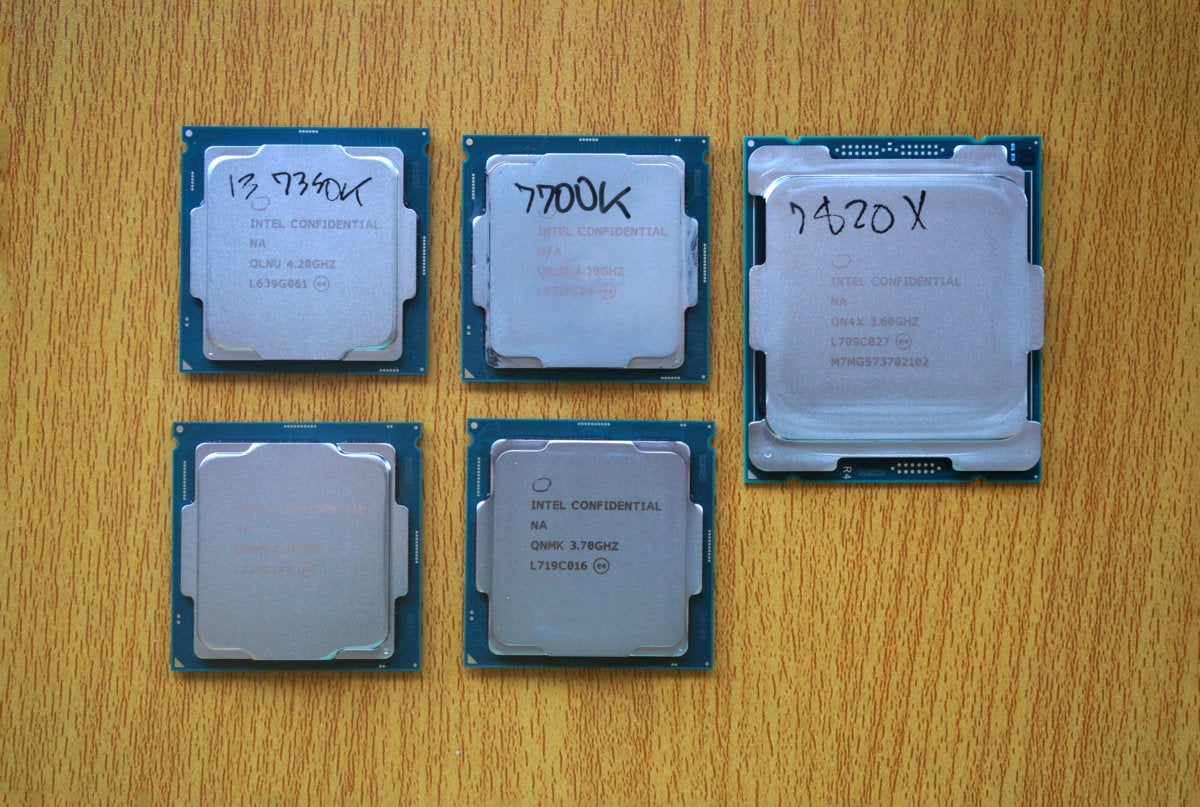
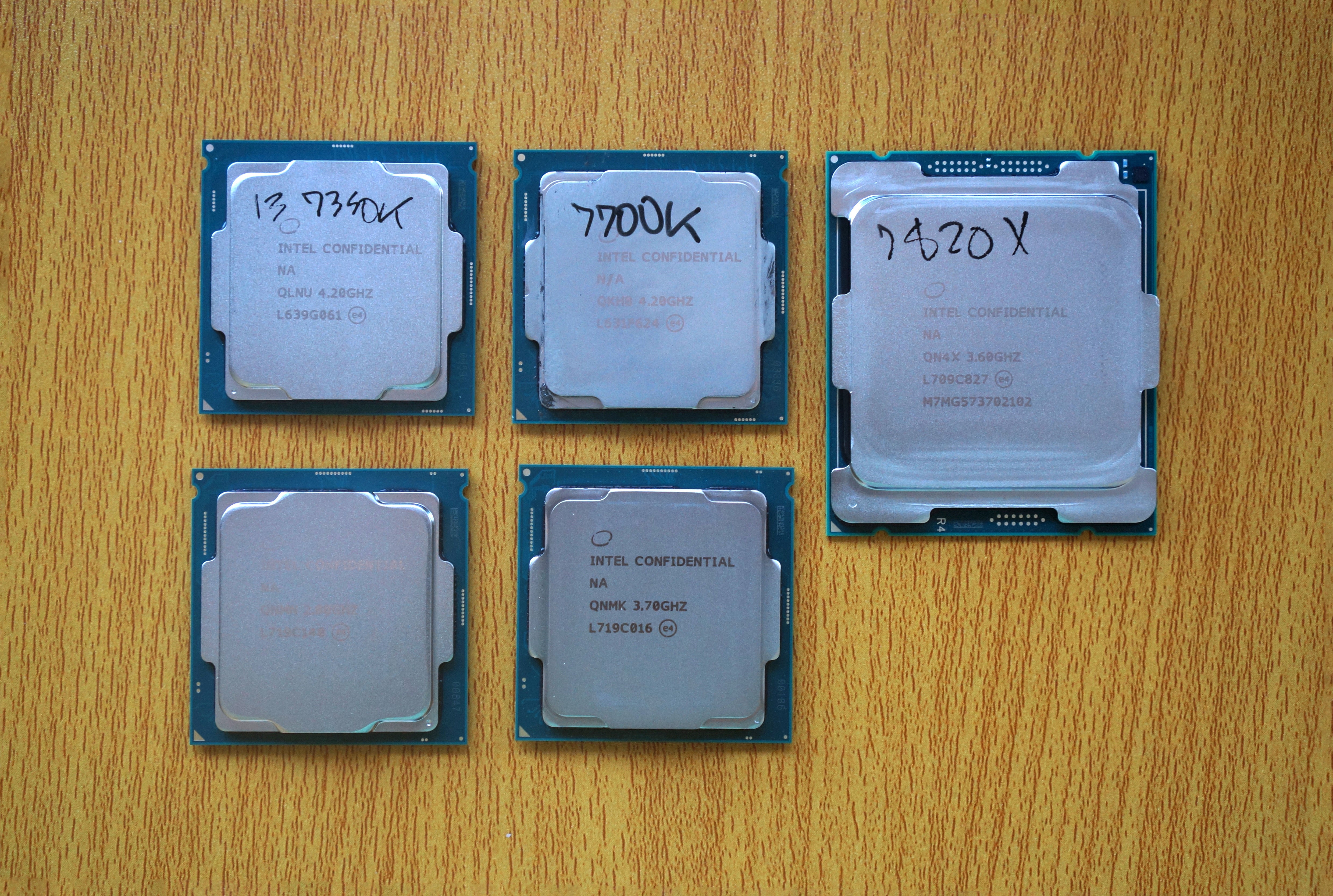
Intel’s new 8th-gen Core i5-8600K (lower left) next to the 8th-gen
Core i7-8700K (lower right.) On the top left is a Core i3-7350K Kaby
Lake. In the top middle is a Core i7-7700K Kaby Lake. The last, larger
chip is a Kaby Lake X Core i7-7820X, which fits in the same socket as
Skylake X.
Core i7-8700K Application Performance
To
dig into the performance characteristics of Core i7-8700K, we ran the
CPU through a gauntlet of rendering, encoding, and other productivity
tests. If you use mostly Office applications, a browser and gaming, our
single-threaded performance results matter more. If you edit video or
perform other CPU-intensive tasks on your PC, pay closer attention to
the multi-threaded performance.
Cinebench R15 performance
Our
first test is Maxon’s Cinebench R15. It’s a popular, free benchmark
based on the same engine used in the company’s professional Cinema 4D
program. Professional 3D rendering tends to like CPU cores and threads,
and the default setting for Cinebench exploits all available cores.
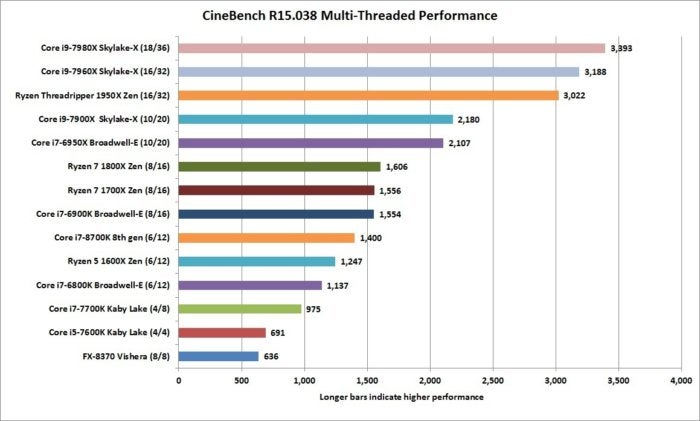
The
multithreaded results bear this out, as the CPUs we’ve tested sort out
based on the thread count. In the crazy range, we have Intel’s Core i9
chips and AMD’s Threadripper. From there the list sorts out nicely based
on the number of cores and whether the CPUs have Symmetric
Multithreading (SMT), or what Intel calls Hyper-Threading. IDG
The Cinebench R15 puts the 6-core Core i7-8700K between the 8-core and 6-core. In multi-threaded tests, the new Core i7-8700K
(the second orange bar in the chart above) straddles the line between
the performance of a 6-core CPU and an 8-core CPU. In Cinebench, which
scales very well with the number of cores, it comes very close to the
performance of an 8-core. The Ryzen 7 1700X easily walks away from the
Core i7-8700K, but if you have any doubts as to whether Core i7-8700K is
better left to compete with AMD’s 6-core Ryzen 5 chips, the result
above should answer that.
We also run Cinebench in single-threaded
mode to measure the performance of a CPU when an app or game only uses
one core. For the most part, such a test favors CPUs with higher clock
speeds and greater efficiency. With Core i7-8700K (see the pink bar
below), you get that in spades, hearts, clubs, and diamonds. IDG
For single-threaded tasks, the Core i7-8700K squeaks by the Core i7-7700K CPU to win the day. With a boost clock of 4.7GHz, the Core i7-8700K
slides past the previous top dog, the Core i7-7700K which has a top
boost clock of 4.5GHz. Intel actually dominates the single-threaded
performance with 8th-gen, Kaby Lake and Skylake-X lining up in an
orderly fashion ahead of the pack of older Intel CPUs and AMD’s chips.
AMD
fans will protest that single-threaded performance doesn’t matter in a
multi-threaded world, but the harsh truth is a huge swath of
applications and games don’t exploit more than one CPU core at a time.
Despite taking a backseat to Ryzen 7 1700X in the multi-threading test,
Core i7-8700K wins this one in a big, big way.
Blender Performance
Our
second test is another 3D render app called Blender. It’s an
open-source, free application that sees heavy use in many independent
movies. Like Cinebench, it favors more cores and more threads, but we’ve
found that it doesn’t always scale that well with core count.
Blender’s
performance can vary greatly with the workload thrown at it. For our
test, we use the free BMW CPU test. The result (see the navy-blue bar in
the middle of the chart, below) shows the sheer strength of this spunky
little 6-core Coffee Lake chip, which isn’t content to slum it with the
6-core Ryzen 5 and Core i7 Broadwell-E chip. Its score, in fact, is
dead even with the 8-core Ryzen 7 1700X. A 6-core chip that can hang
with the 8-core chips is something to be respected. IDG
The Coffee Lake CPU actually ties with the Ryzen 7 1700X in this
multi-threaded Blender test, despite having four fewer threads than the
AMD CPU.
POV-Ray Performance
The Persistence of Vision Raytracer (POV-Ray)
is a ray tracer that dates back to the days of the Commodore Amiga.
Like Blender and Cinebench, it generally favors efficient CPU cores.
Once again we see the 6-core Core i7-8700K (the second orange bar,
below) hanging closer to the 8-core CPUs than the 6-core chips using the
internal benchmark. IDG
Again, the 6-core Core i7-8700K really punches above its class. We also run POV-Ray’s internal single-threaded
test. No surprise, the high-clocked Core i7-8700K (light blue, below)
and Core i7-7700K (light pink, below) are in a dead heat. The lineup
reinforces Intel’s lead in single-threaded apps, just as we saw in
Cinebench. The first AMD CPU straggles in at 9th place. If you’re
wondering why the Ryzen 7 1700X actually loses to the cheaper 6-core
Ryzen 5 1600X, it’s likely due to the slightly higher clock speeds of
the budget 6-core chip. IDG
Wow: POV Ray’s single-threaded rendering benchmark puts the 6-core CPU right alongside the quad-core Core i7-7700K.
Corona Renderer
Our final 3D rendering
test is fairly new to us and actually came to our attention through AMD.
Our sample set is smaller, but it again shows the Ryzen 7 1700X just
can’t shake the Core i7-8700K (the blue bar at the bottom). The Ryzen 7
wins—but by an uncomfortably slim margin considering it packs four more
threads than the Core i7-8700K. IDG
The Corona Renderer benchmark again shows how the 6-core Core
i7-8700K outdoes itself with performance just shy of the 8-core Ryzen 7
1700X.
Handbrake Encode
The world isn’t all
about rendering 3D models, of course. More people are likely to be
encoding video instead, which is where the free and popular Handbrake
encoder comes in. For this test, we use an older version and convert a
30GB, 1080p MKV file using the Android Tablet preset. Handbrake tends to
favor CPUs with more cores and threads, and we see that familiar
pattern: Core i7-8700K (the second orange bar, below) hanging right
there with the 8-core CPUs, rather than with the 6-core chips. It's not
enough to outpace the 8-core Ryzen chips or the the 8-core Broadwell-E,
but it's closer than you’d expect. IDG
Our Handbrake Encode shows the Core i7-8700K keeping pace with the 8-core CPUs rather than with the 6-core chips.
Adobe Premiere Creative Cloud 2017
Our
next video test uses Adobe’s professional Premiere Creative Cloud 2017
to encode an actual video project shot by our video crew in 4K on a Sony
Alpha camera.
For this test, we keep the video project on a
Plextor PCIe SSD and write the project to the same device, in order to
remove storage variability from the test.
We use Premiere to
encode it using the Blu-ray preset and select the Maximum Render quality
option, which ups the image quality when changing resolution (which we
also do.) We specify that Premiere use the CPU for encoding rather than
the GPU.
Some video professionals will scoff at using much slower
CPUs for a video job, but image-quality snobs will argue that the best
result is achieved using the CPU. IDG
The 6-core Coffee Lake chip hangs with the 8-core chips in our CPU-centric video encoding test. The results again put the 6-core Core i7-8700K
in the running with the 8-core chips. But we still hear those video pros
tsk-tsking our choice of CPU encoding, so we also ran our test using
the GeForce GTX 1080 for CUDA-based encoding. Though some believe the
CPU makes no difference, it’s clear that core count still matters even
on a GPU encode. It’s also clear the Core i7-8700K can hang with those
8-core CPUs. IDG
Despite being just a 6-core CPU, the Core i7-8700K hangs out with the 8-core CPUs for GPU-based encoding.
Core i7-8700K Gaming Performance
For
our Threadripper and Core i9 tests, we didn’t dwell on gaming
performance. Although important, those who buy $1,000 and $2,000 CPUs
need them for rendering and encoding, not gaming.
When you’re
talking about $360 mainstream chips (albeit higher-end mainstream
chips), gaming matters a whole lot more. Because we wanted to use the
very latest GeForce drivers on our tests, we also restricted our results
to the Ryzen 7 1700X and Core i7-8700K, as we don’t have every single
CPU on record using the newest GPU drivers.
Goes where you go. The new unlocked Samsung Galaxy S7 is designed for the way you live, giving you access to mos.t U.S. GSM and CDMA networks. 1 And you can take it virtually anywhere you go, from Mexico City to Paris, and still stay connected. 2 Plus you can rest easy with Samsung’s standard U.S. limited warranty. 1 Wireless voice, data and messaging services compatible with GSM networks such as AT&T and T-Mobile and CDMA networks such as Verizon, Sprint and US Cellular®. Support for certain features and services such as VoWiFi and hotspot, vary by wireless service provider. See provider for details. 2 International calling services and coverage vary by service provider. See provider for details. Slim in a big way. Featuring a Quad HD Super AMOLED display, the Galaxy S7 has an eye-popping picture you’d expect from Samsung; and, just as impressive, the big screen fits on an incredibly slim design. Fully immerse yourself in movies, games and more—...
 Gordon Mah Ung
  IDG
IDG 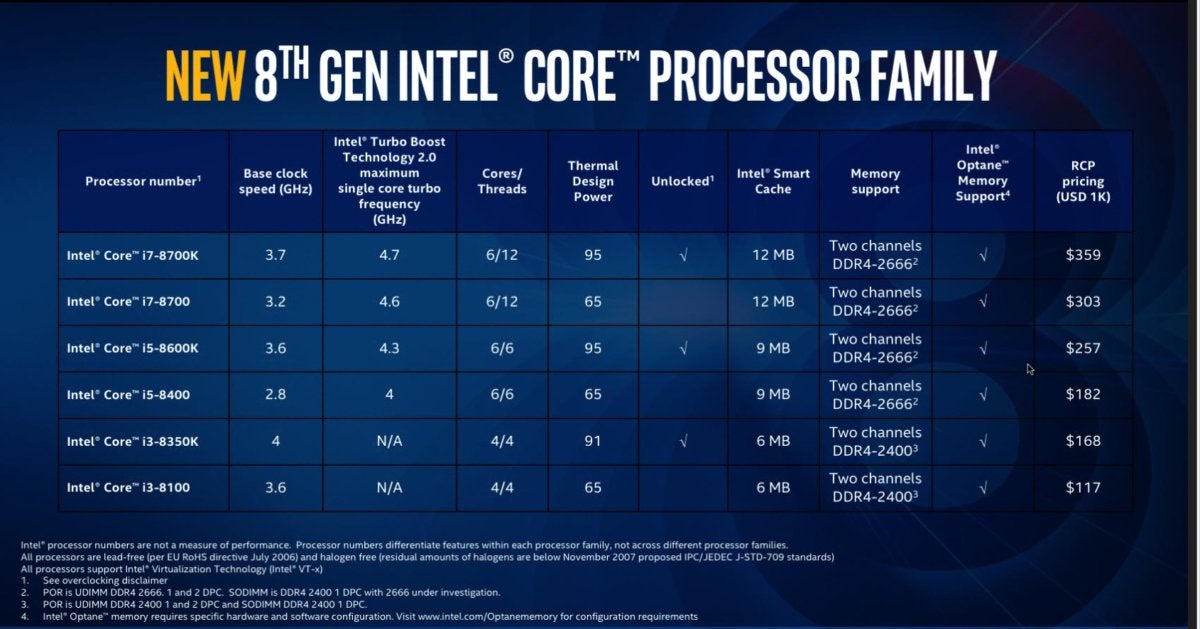 Intel
Intel 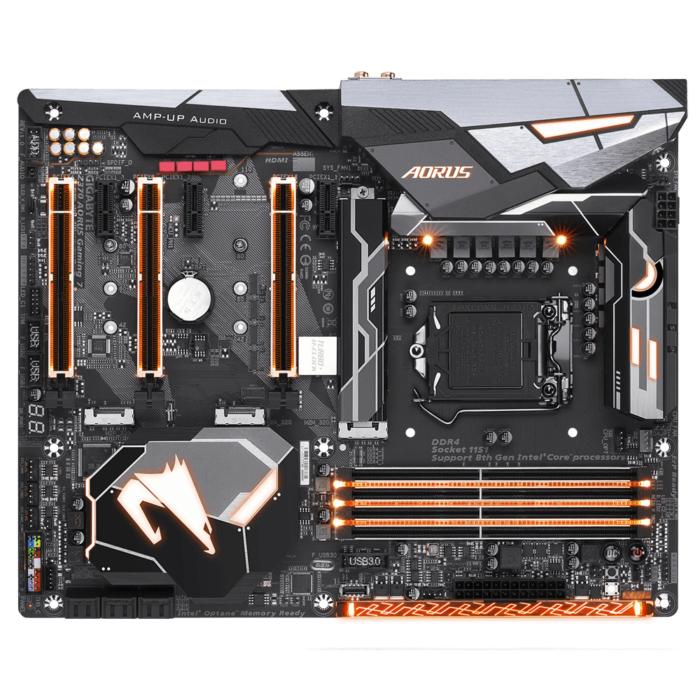 Gigabyte
  Gordon Mah Ung
  IDG
IDG  IDG
IDG 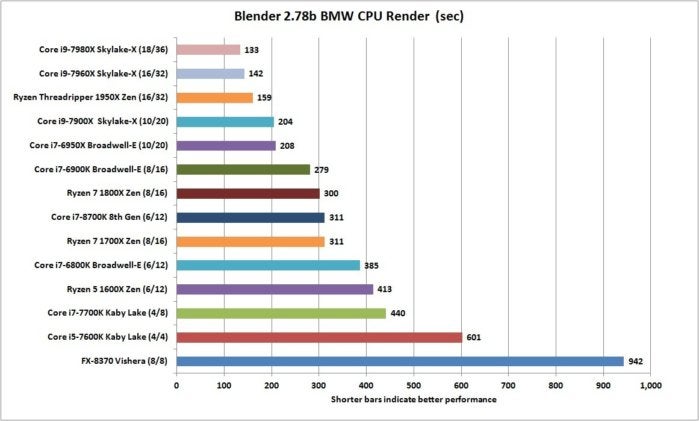 IDG
IDG 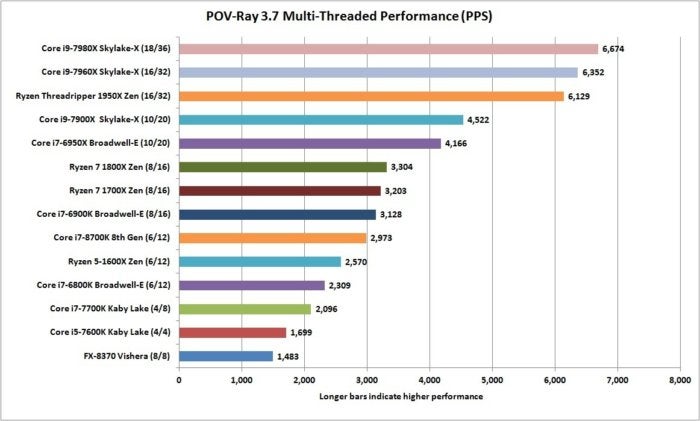 IDG
IDG  IDG
IDG 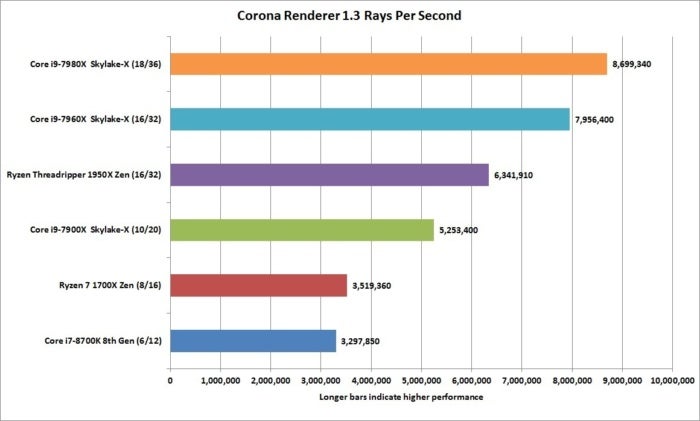 IDG
IDG 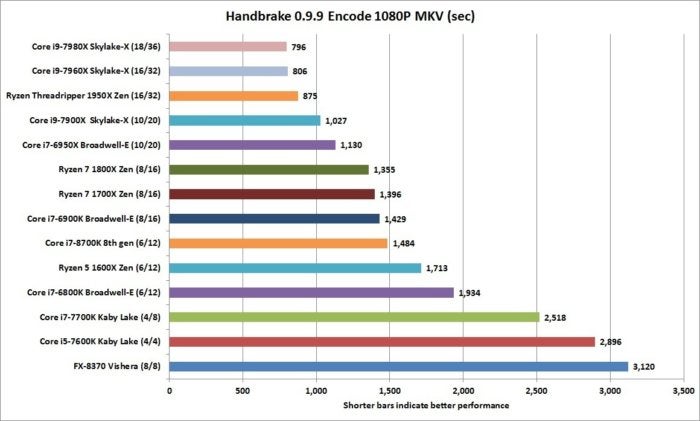 IDG
IDG 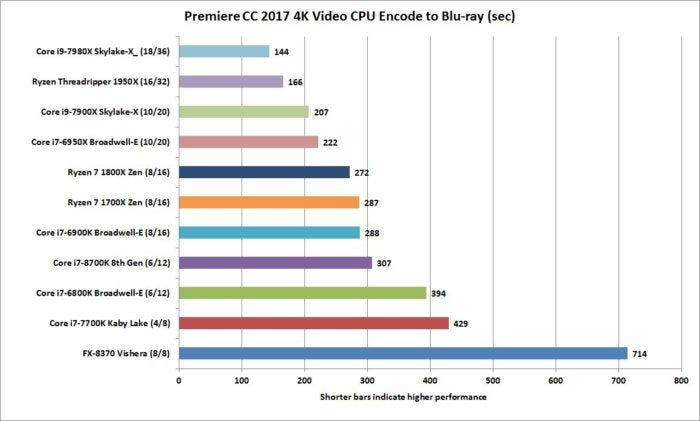 IDG
IDG 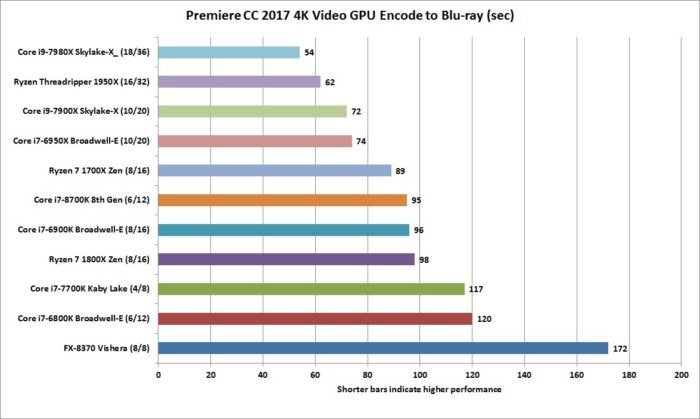 IDG
IDG 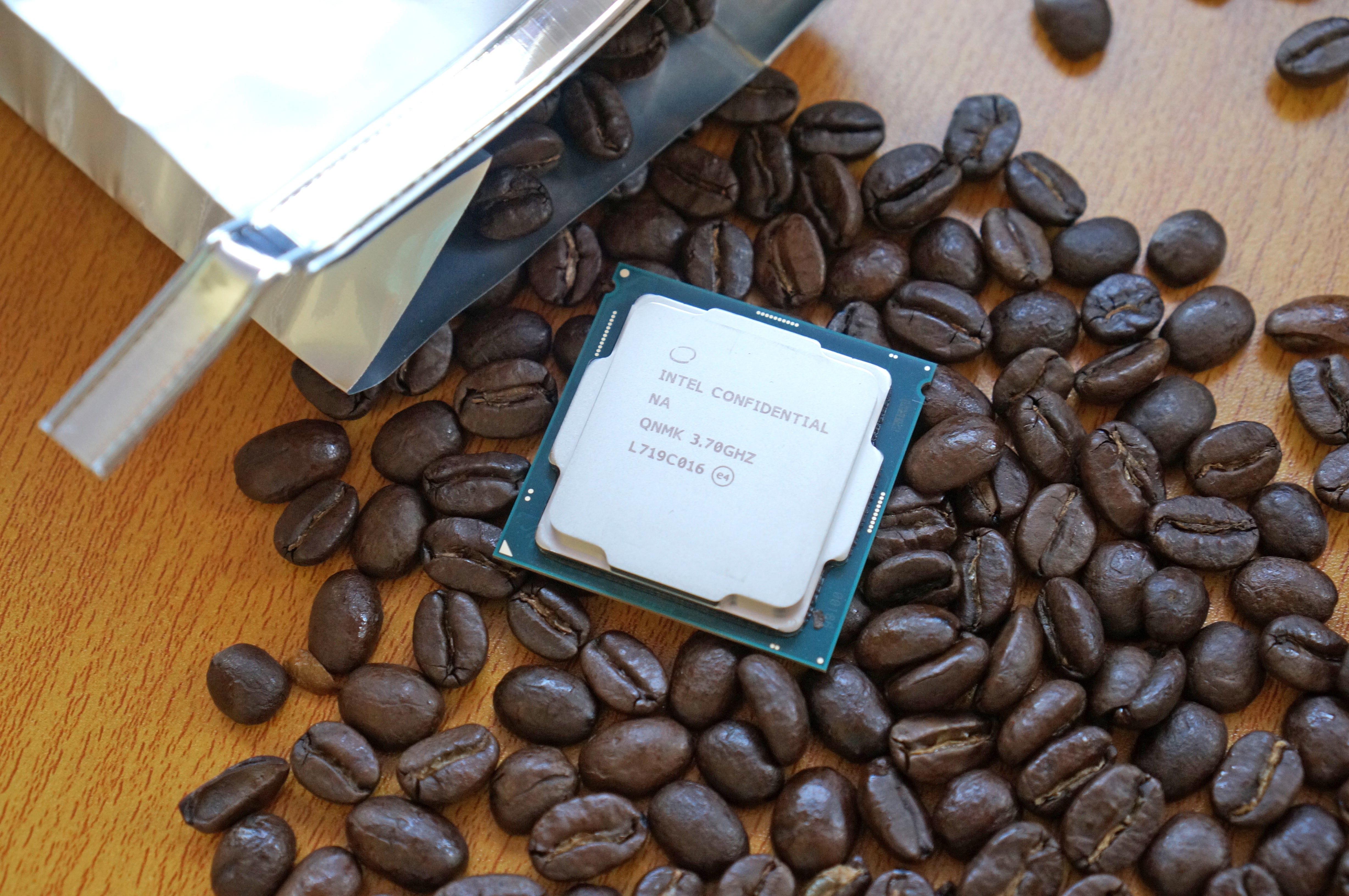 Gordon Mah Ung
  IDG
IDG 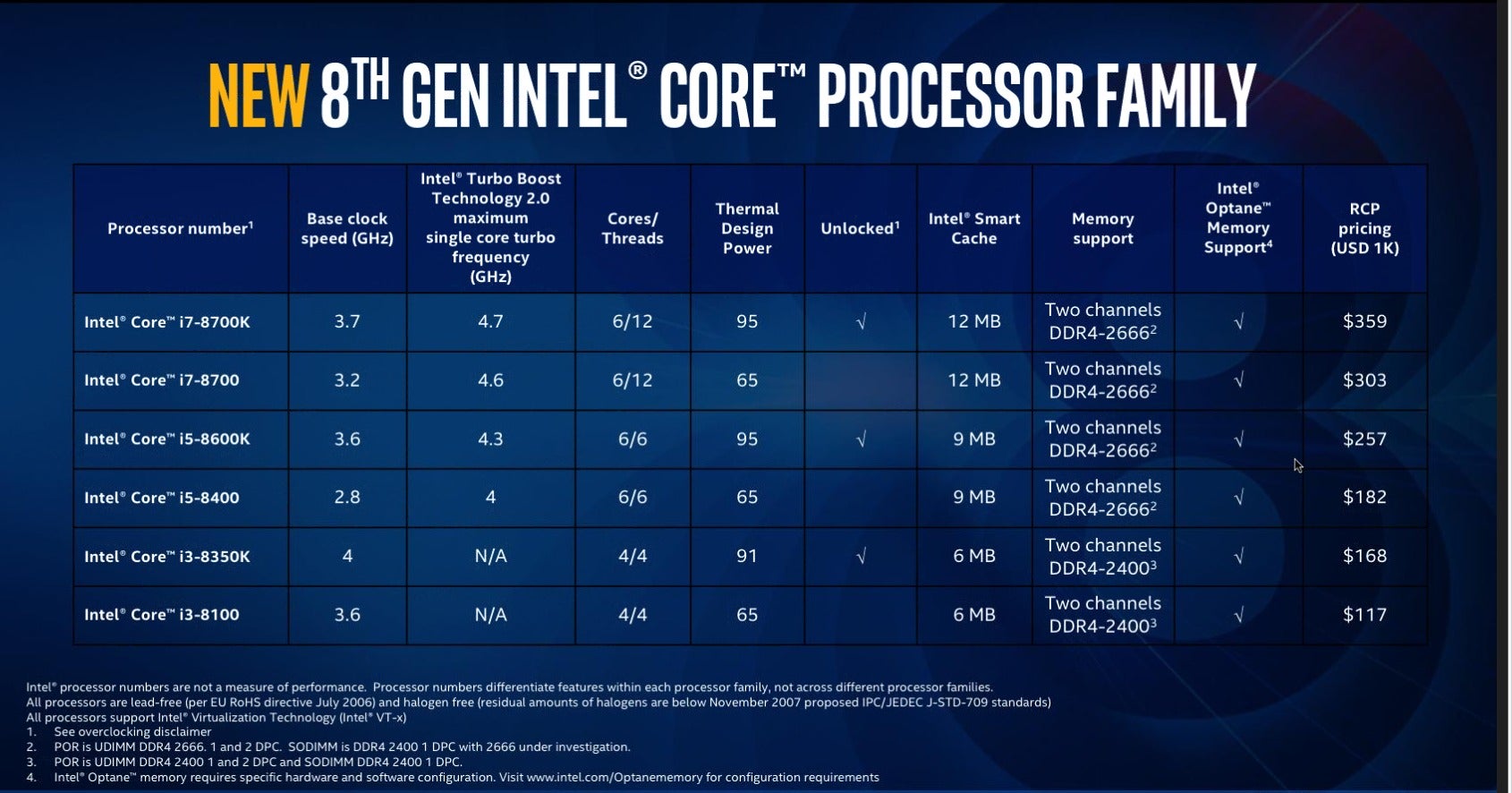 Intel
Intel 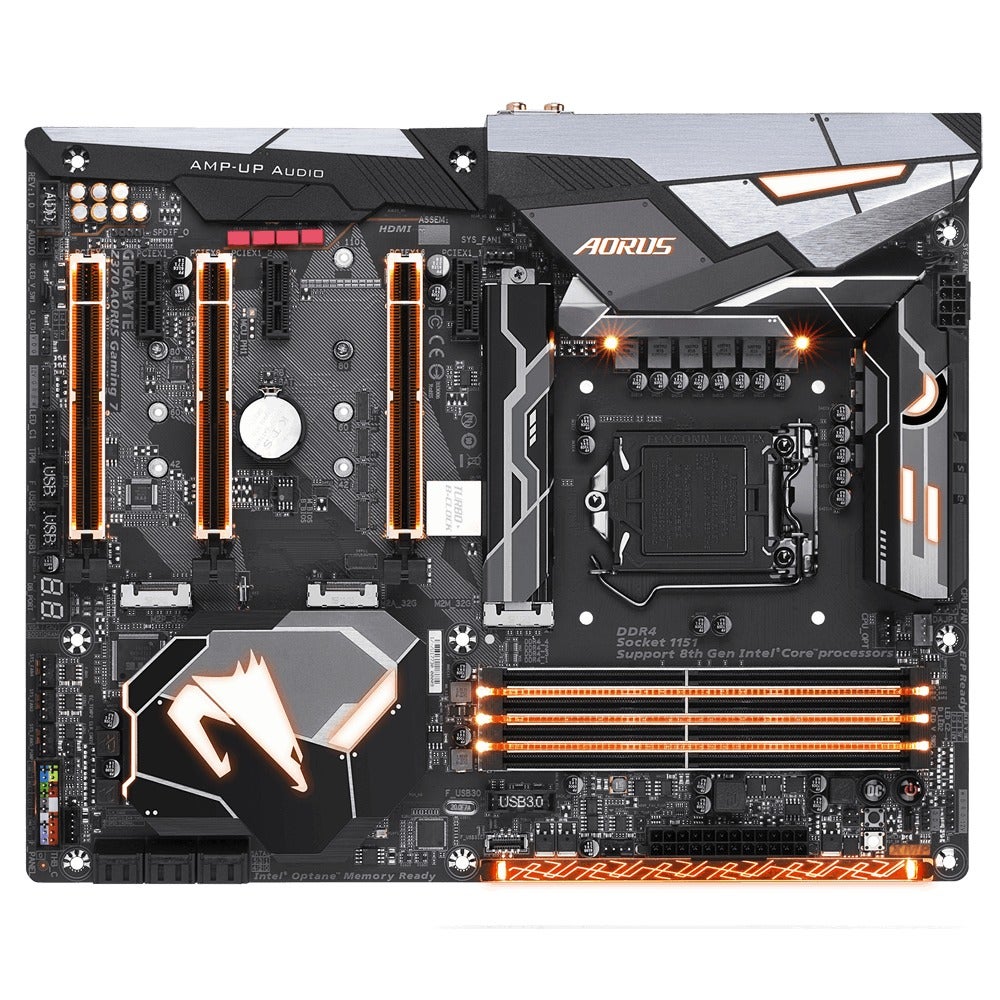 Gigabyte
  Gordon Mah Ung
  IDG
IDG 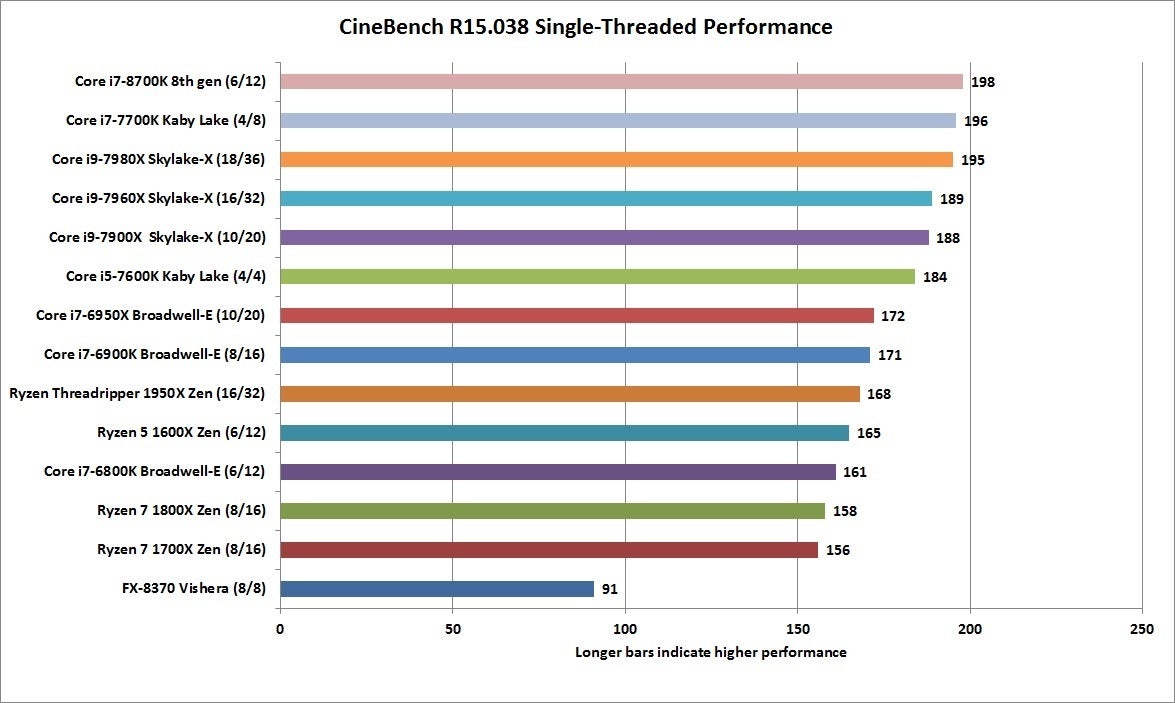 IDG
IDG 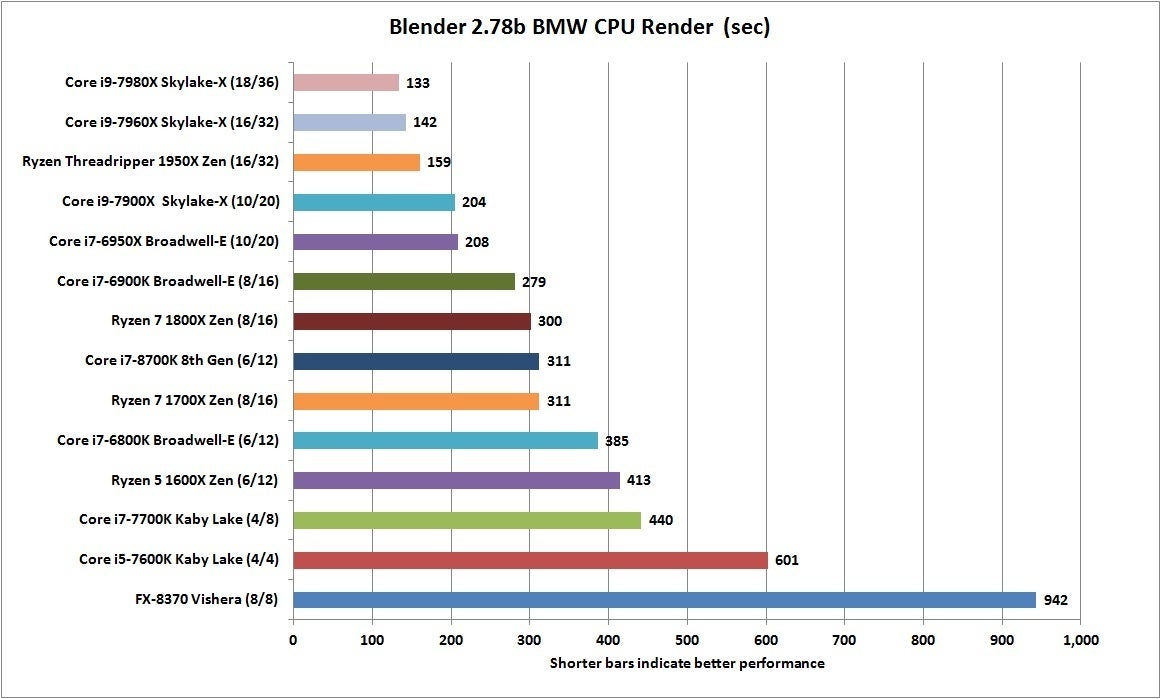 IDG
IDG 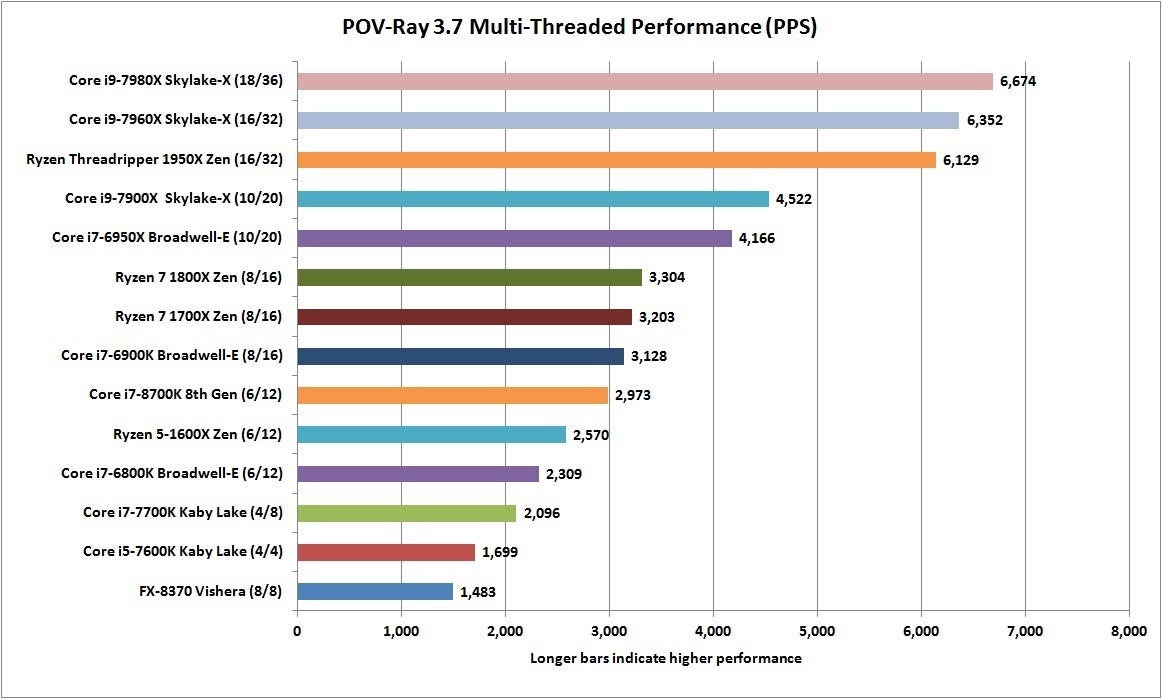 IDG
IDG 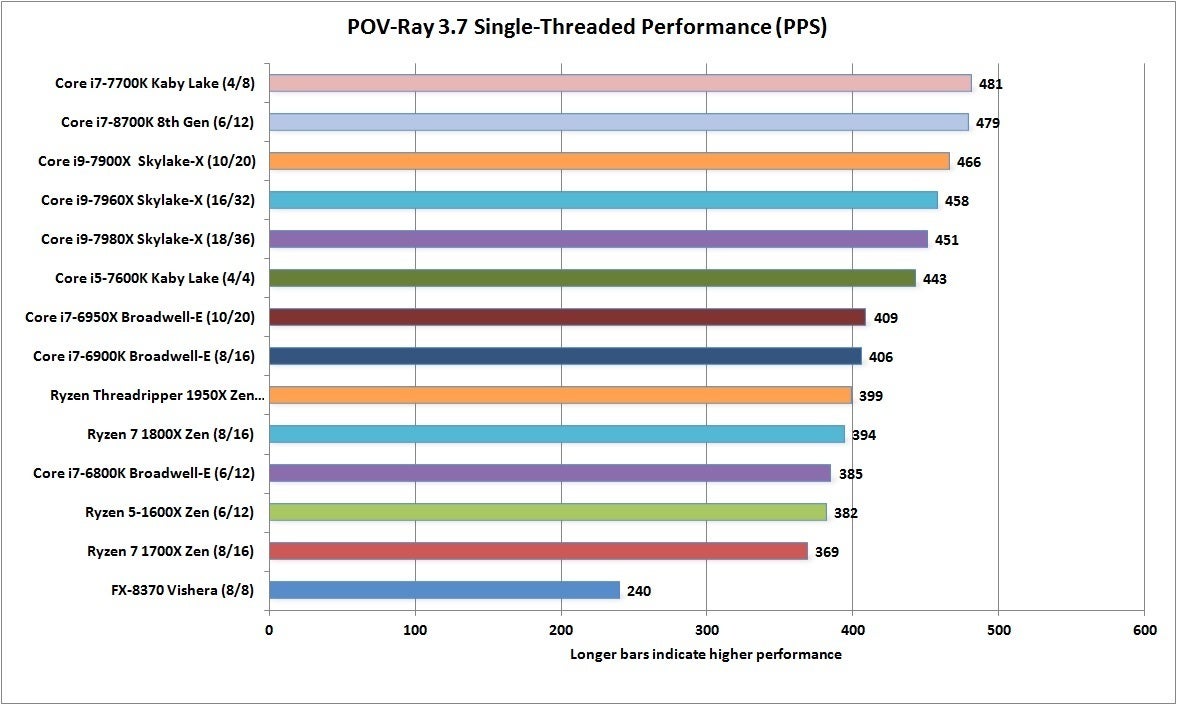 IDG
IDG 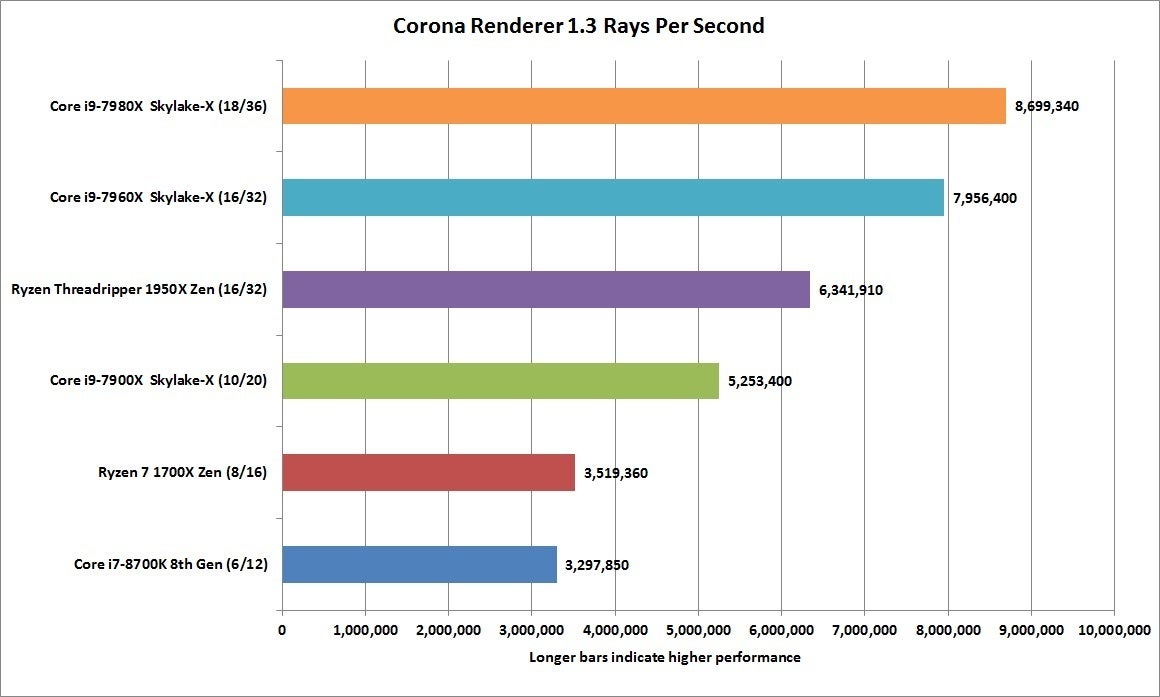 IDG
IDG 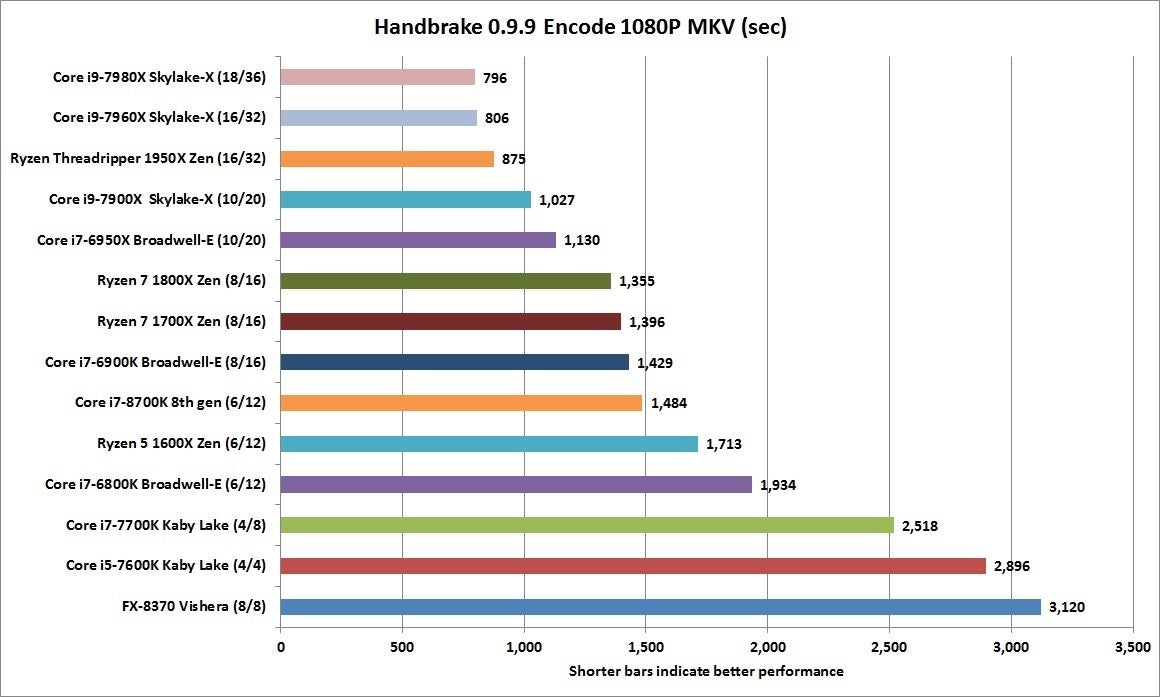 IDG
IDG 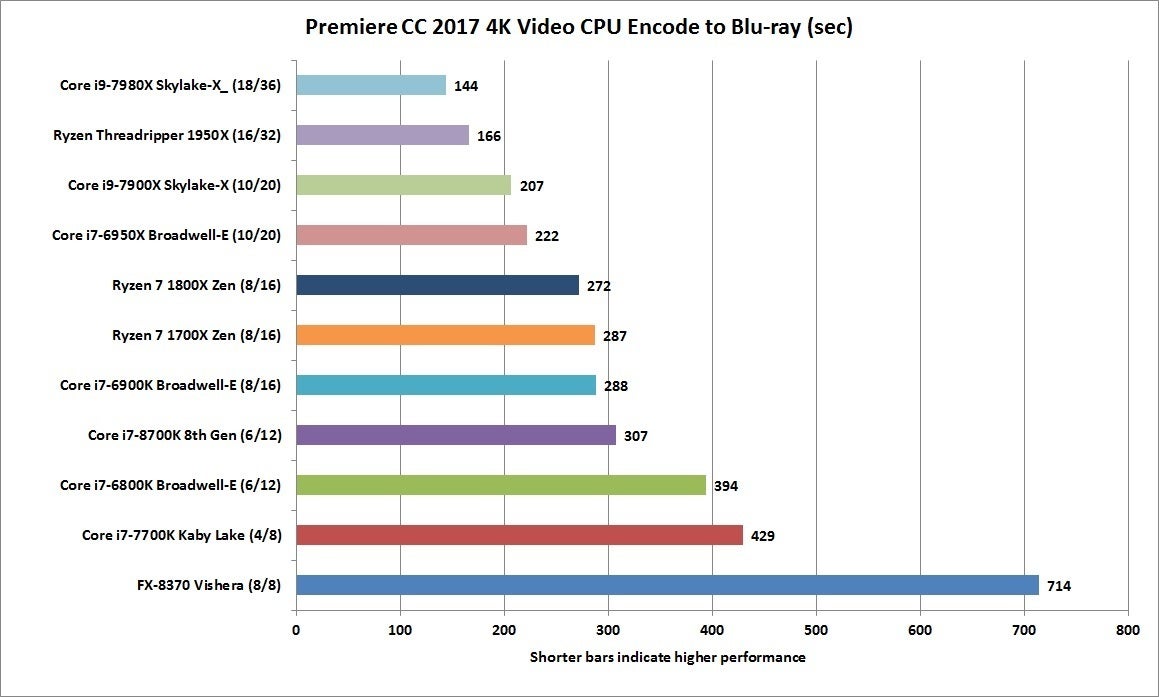 IDG
IDG 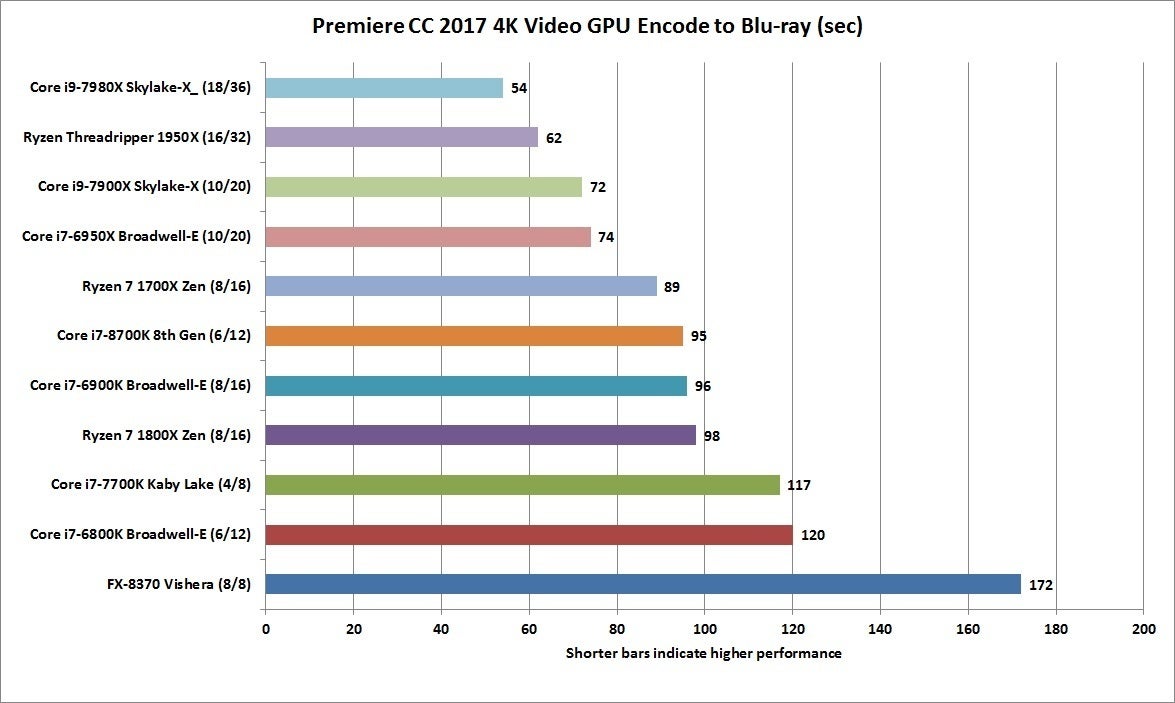 IDG
IDG 
Commentaires
Enregistrer un commentaire